How do I backup my cPanel account?
Print- 1
- Log in to your cPanel account.
- Find and click the "Backup Wizard" option under the "Files" section.
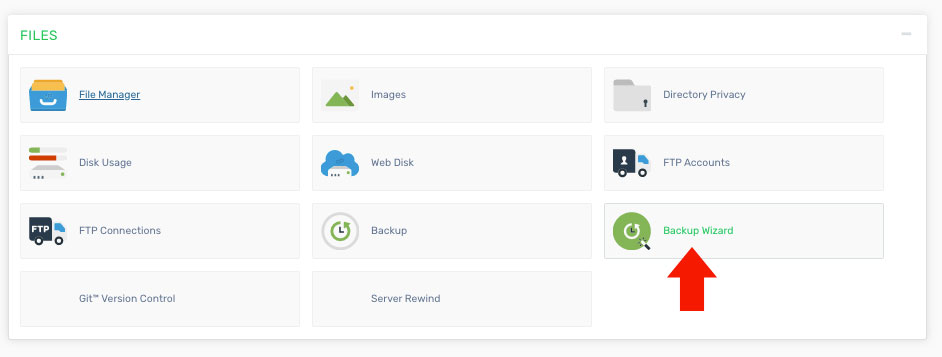
Choose the type of backup you want to generate: "Full" or "Partial".
- Full - Creates a complete backup of your entire account, including all files, databases, and settings.
- Partial - Allows you to back up specific data only. These backups can be restored directly through the cPanel interface.
Was this answer helpful?
Related Articles
How do I change my cPanel Password? To update your cPanel password, it is important to make the change from your client area instead...
How do I change my cPanel theme? Log in to your cPanel account. Find and click the "Change Style" option under the...
How do I change my language in cPanel? Log in to your cPanel account. Find and click the "Change Language" option under the...
How do I change the version of PHP I am using? The PHP Selector allows you to choose and manage different PHP versions for your account. Keep in...
How do I find my PHP version? Log in to your cPanel account. On the right-hand side under the "Stats" section, find the row...
Powered by WHMCompleteSolution

