What is an entry process and what does it mean?
Print- 2
When you log in to cPanel, you will see a statistic labeled "Number of Processes" displayed on the right-hand side under the Statistics section.
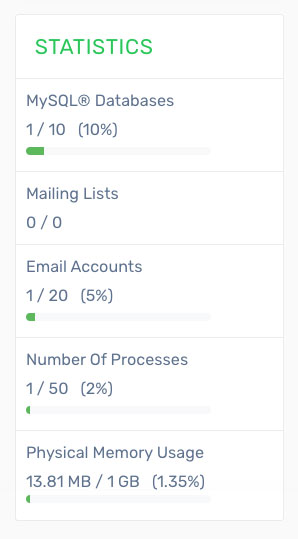
Entry Processes
An "Entry Process" refers to the number of PHP scripts running simultaneously on your account. On standard shared hosting, this is typically limited to 50 concurrent processes.
It’s important not to confuse entry processes with the number of visitors your website can handle. Since most PHP processes complete within a fraction of a second, many visitors can be served over time without reaching the limit. It is unlikely that all users would access your website at the exact same moment.
In most cases, a limit of 50 entry processes can support approximately 200–250 active visitors. However, if your website experiences low traffic but consistently reaches this limit, it may indicate inefficient or slow-running scripts. This is often caused by outdated CMS components such as plugins or themes.
For example, if a page takes 0.1 seconds to load, multiple users can access it sequentially using minimal resources. However, if several users request the same page at the exact same time, multiple entry processes will be used briefly to serve those requests.
Other operations such as cron jobs, shell scripts, and background tasks also consume entry processes for the duration of their execution.
Since simultaneous activity consumes server resources, entry process limits are enforced to ensure fair usage and maintain overall server performance for all users.
If your account reaches the maximum number of entry processes and another request is made, the visitor may encounter a 503 error. These limits are configured to handle typical usage comfortably while preventing service disruption.
In many cases, reaching resource limits is caused by automated bots rather than genuine visitors. This could include malicious login attempts or poorly configured crawlers accessing your site too frequently.
If your website becomes temporarily unavailable due to such activity, it helps protect both your account and the server. Once the activity subsides, normal access is restored without requiring additional resources.
Additionally, optimizing your website can significantly reduce resource usage. Enabling caching, minimizing CSS and scripts, and avoiding poorly coded plugins can improve performance and efficiency.
Was this answer helpful?
Related Articles
How do I backup my cPanel account? Log in to your cPanel account. Find and click the "Backup Wizard" option under the "Files"...
How do I change my cPanel Password? To update your cPanel password, it is important to make the change from your client area instead...
How do I change my cPanel theme? Log in to your cPanel account. Find and click the "Change Style" option under the...
How do I change my language in cPanel? Log in to your cPanel account. Find and click the "Change Language" option under the...
How do I change the version of PHP I am using? The PHP Selector allows you to choose and manage different PHP versions for your account. Keep in...
Powered by WHMCompleteSolution

