How do I configure hotlink protection?
Print- 1
- Log in to your cPanel account.
- Find and click the "Hotlink Protection" option under the "Security" section.
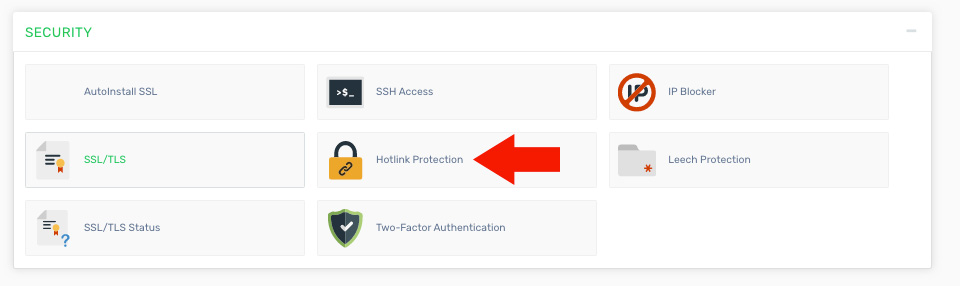
- To enable or disable Hotlink Protection, click the "Enable" or "Disable" button.
- In the "URLs to allow access" section, enter your domain name and any subdomains that should have access to your resources (such as images).
- In the file extensions section, specify the types of files you want to protect. Common extensions are usually pre-filled.
- Choose whether to allow direct access to these files (accessible via browser but not from external websites).
- Optionally, enter a redirect URL for blocked requests, such as a page indicating that hotlinking is not permitted.
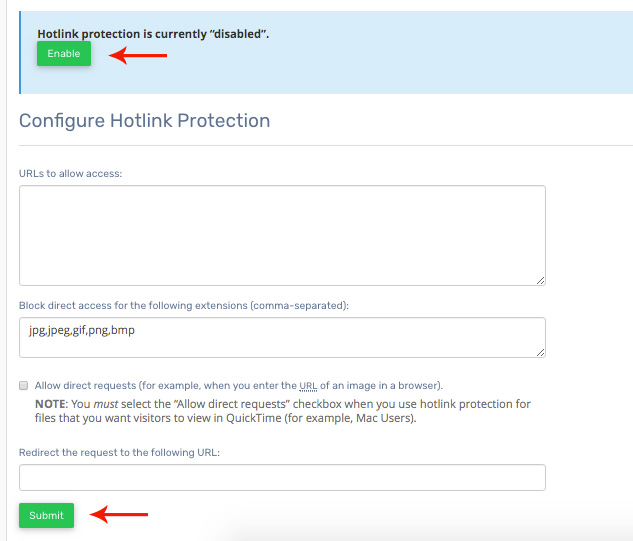
- Click the "Submit" button to apply and save your settings.
Was this answer helpful?
Related Articles
How do I block an IP address from accessing my site? If you want to prevent a user from accessing your website, you can block their IP address....
How do I password protect a directory? Log in to your cPanel account. Find and click the "Leech Protection" option under the...
What is hotlink protection? Hotlink protection prevents other websites from directly using your files, such as images or...
What is Mod Security and what does it do? One component of RackState®'s server security system is an Apache module known as ModSecurity...
Powered by WHMCompleteSolution

