How do I create a mailing list?
Print- 0
1. Log in to your cPanel account.
2. Find and click the "Mailing Lists" option under the "Mail" section.
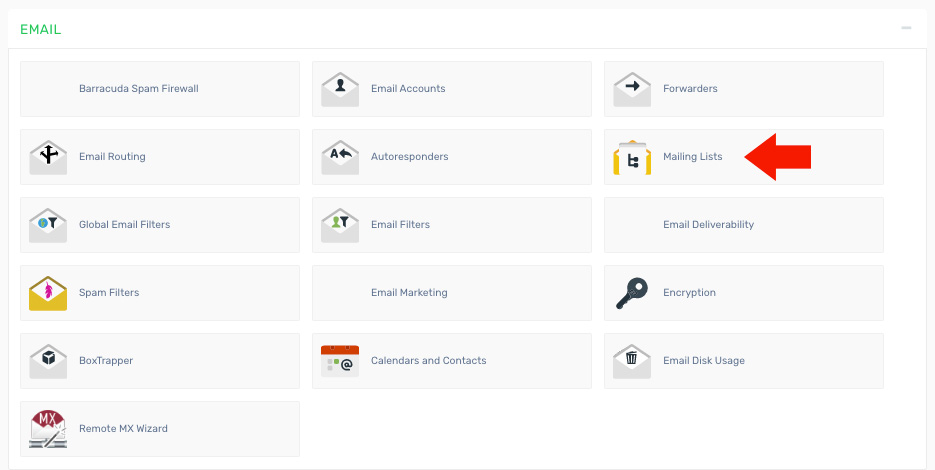
3. Enter the required details:
- List Name - The name you want to assign to the mailing list (e.g., newsletter)
- Domain - The domain where the mailing list will be created
- Password - A password to manage the mailing list
- Password (confirm) - Re-enter the password for confirmation
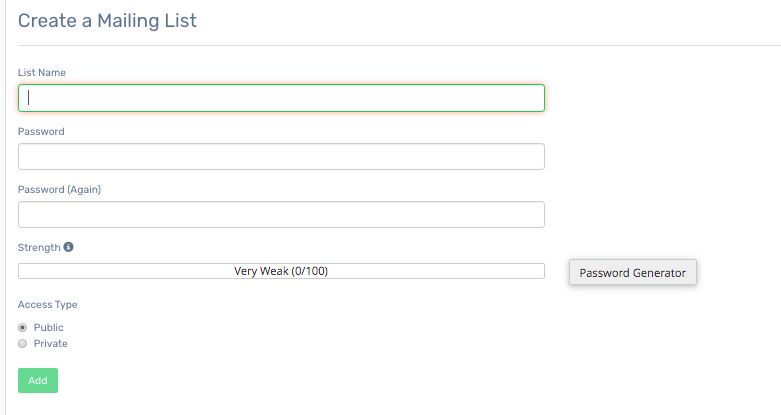
4. Click the "Create Mailing List" button.
5. After creation, the mailing list will appear below, where you can manage it, update the password, delete it, or add/remove email addresses.
Was this answer helpful?
Related Articles
How do I access my webmail? Webmail can be accessed using the following URL: http://yourdomain.com/webmail Note:...
How do I change my email password? If you know your email password: Log in to your webmail account. On the main page, click...
How do I configure my Default Address? 1. Log in to your cPanel account. 2. Find and click the "Default Address" icon under the "Mail"...
How do I create an email account in cPanel? 1. Log in to your cPanel account. 2. Find and click the "Email Accounts" option under the "Mail"...
How do I create an email filter for a specific user? 1. Log in to your cPanel account. 2. Find and click the "Global Email Filters" option under the...
Powered by WHMCompleteSolution

