How do I create a subdomain?
Print- 0
1. Log in to your cPanel account.
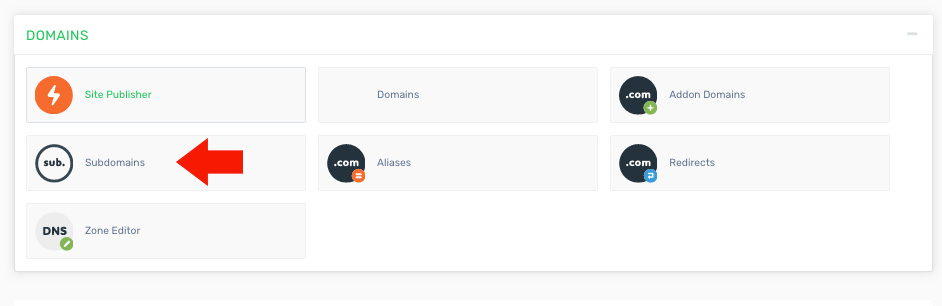
2. Find and click the "Subdomains" option under the "Domains" section.
3. Enter the subdomain name and specify the Document Root. The Document Root is the folder inside your main domain’s directory that will load when the subdomain is accessed. The content of this folder can also typically be accessed via a corresponding path like yourdomain.com/subdomain.
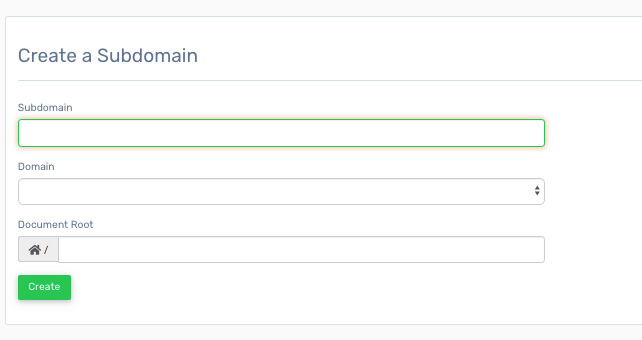
4. Click the "Create" button to complete the setup of your subdomain.
Was this answer helpful?
Related Articles
How do I create a parked domain or alias? 1. Log in to your cPanel account. 2. Find and click the "Alias Domains" option under the...
How do I create a redirect? 1. Log in to your cPanel account. 2. Find and click the "Redirects" option under the "Domains"...
How do I create an addon domain? Log in to your cPanel account. Find and click the "Addon Domains" option under the "Domains"...
How do I transfer a domain from Godaddy to Rackstate To Obtain an Authorization Code via Email (Active Domain) from GoDaddy Log in to your Account...
How long do domains take to propagate? Domain propagation typically takes between 15 minutes and 3 hours, but in some cases, it may take...
Powered by WHMCompleteSolution

