How do I configure a cron job?
Print- 0
- Log in to your cPanel account.
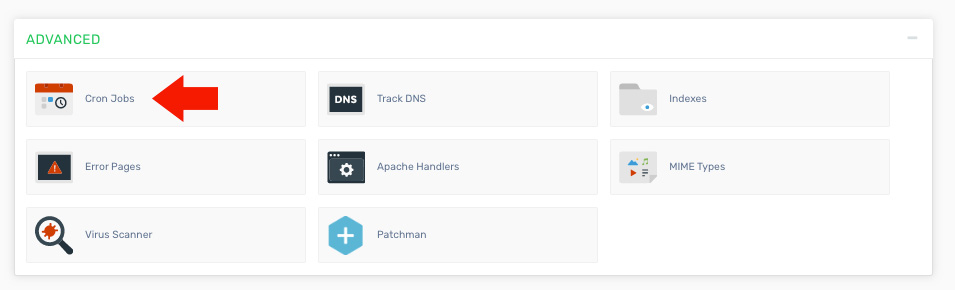
- Find and click the "Cron Jobs" option under the "Advanced" section.
Locate the Cron Jobs icon in the Advanced section.
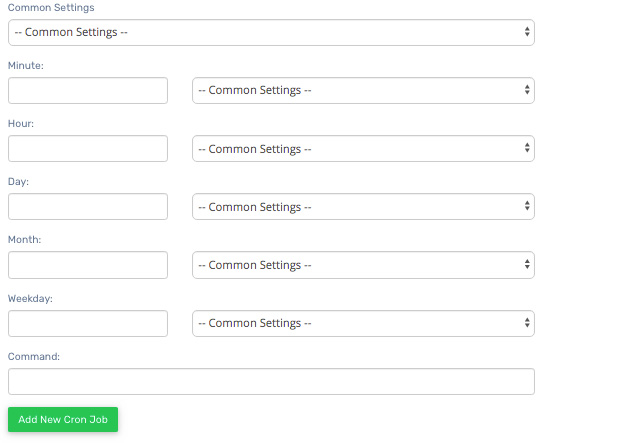
- Enter the required details to set up your cron job.
- Common Settings - Use this dropdown to quickly apply predefined scheduling values.
- Minute - Specify the minute interval for execution.
- Hour - Define the hour when the cron job should run.
- Day - Set the day of the month for execution.
- Month - Choose the month for the scheduled task.
- Weekday - Select the day of the week for execution.
- Command - Enter the command to be executed. For example, to run a PHP script:
- php -q /home/ACCOUNTNAME/public_html/script_in_my_root_directory.php
Was this answer helpful?
Related Articles
What are cron jobs? Cron jobs are scheduled tasks that run scripts automatically at defined intervals. For example,...
What are error pages? Error pages are displayed when a user attempts to access a part of your website and an issue...
What does Network Tools do? Network Tools allows you to query a domain and retrieve important information related to it. This...
Powered by WHMCompleteSolution

